Use when · Compare the parts and totals of a metric across plans, periods, or alternatives.
Tm Stacked Variance
How does the mix and total change between scenarios?
Compare scenario totals in a stacked chart, then trace each variance between scenarios.
Version 0.1.3 · released 2026-10-23
 View full size
What it does
Compare scenarios with a stacked variance chart
What the chart shows
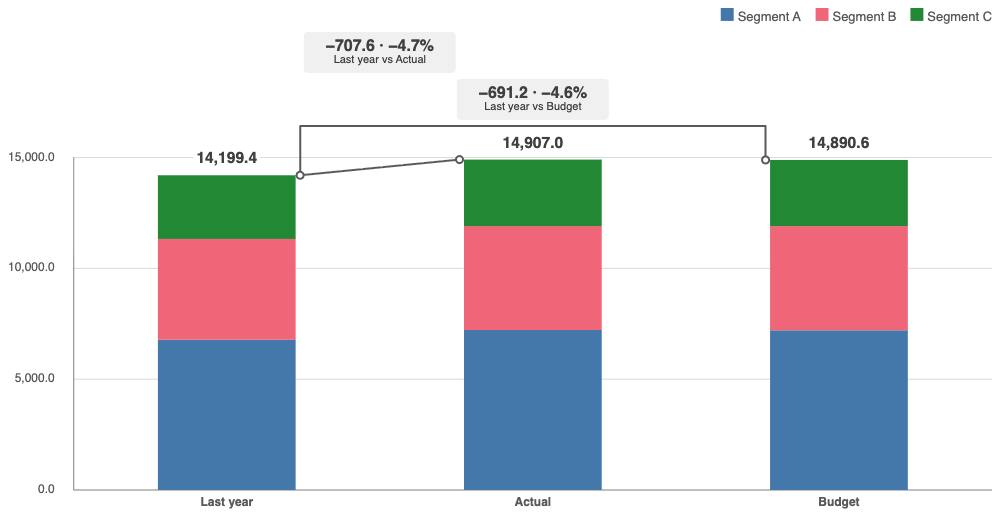
Each scenario appears as one stacked column. Its segments show values for a segment dimension when one is configured, and a total marker shows the net total. A bridge connects the total markers for each comparison. The callout gives the signed variance in value and percent, based on the reference scenario.
Use this chart to compare how a metric's total and segment mix change across plans, periods, or alternatives. It is useful when scenarios represent comparable options and share the same segment definition.
Set up the chart
In the property panel, choose scenarios as measures or as values from a dimension. Add a segment dimension when needed. Set comparison pairs directly or use a preset. Choose how to label segments and callouts, and adjust the legend, total labels, tooltip, segment limit, and increase direction. The tooltip can include up to three expression rows.
Selections
Select a segment to update selections in the Qlik app. In dimension mode, an author can also allow scenario selection. The chart marks selected segments so you can see the selection state.
Keyboard use
Tab to the chart. Use the arrow keys to move between segments and comparison callouts. Press Enter or Space to select a focused segment. Press Escape from an open tooltip to return to its mark. The accessible data table provides the chart values and comparisons in text form.
Key features
- Compare stacked scenario totals with a bridge and callout for each configured pair.
- View colored segments with values, shares where they apply, and a net total.
- Choose measure or dimension scenarios and set comparison pairs in the property panel.
- Use presets to compare one scenario with others or compare adjacent scenarios.
- Select segments to filter the app; enable scenario selection for dimension mode.
- Use arrow keys to move through segments and comparisons; press Enter or Space to select a segment.
Extension in this Product
tm-stacked-variance
 View full size
 View full size
More screenshots
 View full size
 View full size
Set up the Product
Installation
Install an extension in Qlik Cloud or client-managed Qlik Sense.
See what changed
Release notes · 0.1.3
Version 0.1.3
This release updates the product branding and improves chart layout in short chart objects.
Branding
The About panel names the product and publisher.
Layout
Short chart objects keep value labels clear in light and dark themes.
Get the latest release
Downloads, version 0.1.3
Extension
Demo App
Release page on GitHub with every file and its checksum.
Ask us for a license
How to get a license
- Review the Product Listing and its documentation.
- E-mail us the Product name, the name of your Qlik Cloud tenant and the number of users.
- We reply to you with the next step.